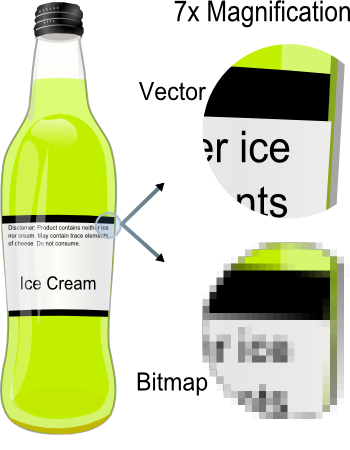
Bitmap เป็นภาพแบบ Resolution Dependent ประกอบขึ้นด้วยจุดสีต่างๆ ที่มีจำนวนคงที่ตายตัวตามการสร้างภาพที่มี Resolution หรือความละเอียดของภาพต่างกันไป หากขยายภาพ Bitmap จะเห็นว่ามีลักษณะเป็นตารางเล็กๆ ซึ่งแต่ละบิตคือ ส่วนหนึ่งของข้อมูลคอมพิวเตอร์
เนื่องจาก Bitmap มีค่า Pixel จำนวนคงที่จึงทำให้มีข้อจำกัดในเรื่องการขยายขนาดภาพ การเปลี่ยนขนาดภาพทำโดยเพิ่มหรือลด Pixel จากที่มีอยู่เดิม เมื่อขยายภาพให้ใหญ่ขึ้น ความละเอียดของภาพจึงลดลง และถ้าเพิ่มค่าความละเอียดมากขึ้นก็จะทำให้ไฟล์มีขนาดใหญ่และเปลืองเนื้อที่หน่วยความจำมากขึ้นตามไปด้วย ภาพที่ขยายโตขึ้นจะมองเห็นเป็นตารางสี่เหลี่ยมเรียงต่อกัน ทำให้ขาดความสวยงาม
ภาพแบบ Bitmap จึงเหมาะสำหรับงานกราฟิกในแบบที่ต้องการให้แสงเงาในรายละเอียด เป็นไฟล์ที่เหมาะกับการทำงานกับภาพเหมือนจริงประเภทภาพถ่าย เพราะ Bitmap มี Channel พิเศษ เรียกว่า Alpha Channel ซึ่งเป็น 32 bit หรือ true color คือสีสมจริง เช่น ภาพที่นำมาใช้กับ PhotoShop จะเป็นภาพเหมือน ภาพถ่าย เพราะไฟล์ที่ได้จาก PhotoShop เป็น Bitmap ในขณะที่ไฟล์ที่สร้างจาก Illustrator จะเหมือนการ์ตูนหรือภาพเขียน เพราะเป็นไฟล์แบบ Vector นอกจากนี้ยังเหมาะสำหรับภาพที่ต้องการระบายสี สร้างสี หรือกำหนดสีที่ต้องการความละเอียดและสวยงาม
ไฟล์ภาพแบบ Bitmap ในระบบวินโดวส์คือ ไฟล์ที่มีนามสกุล .BMP, .PCX. , .TIF, .GIF, .JPG, .MSP, .PCD เป็นต้น สำหรับโปรแกรมที่ใช้สร้างกราฟิกแบบนี้คือ โปรแกรม Paint ต่างๆ เช่น Paintbrush, PhotoShop, Photostyler เป็นต้น
กราฟิกแบบ Vector 
Vector เป็นภาพประเภท Resolution-Independent มีลักษณะของการสร้างให้แต่ละส่วนเป็นอิสระต่อกัน โดยแยกชิ้นส่วนของภาพทั้งหมดออกเป็นเส้นตรง รูปทรงหรือส่วนโค้ง โดยอ้างอิงตามความสัมพันธ์ทางคณิตศาสตร์หรือการคำนวณเป็นตัวสร้างภาพ เป็นการรวมเอา Object (เช่น วงกลม เส้นตรง ทรงกลม ลูกบาศก์และอื่นๆ เรียกว่ารูปทรงพื้นฐาน) ต่างชนิดมาผสมกัน มีทิศทางการลากเส้นไปในแนวต่างๆ เพื่อสร้างภาพที่แตกต่างกันโดยใช้คำสั่งง่ายๆ จึงเรียกภาพประเภทนี้ว่า Vector Graphic หรือ Object Oriented
ลักษณะเด่นของ Vector คือ สามารถยืดหรือหดภาพเท่าใดก็ได้ โดยที่ภาพจะไม่แตก ความละเอียดของภาพไม่เปลี่ยนแปลง คงคุณภาพของภาพไว้ได้เหมือนเดิม และยังสามารถขยายเฉพาะความกว้างหรือความสูง เพื่อให้มองเห็นเป็นภาพผอมหรืออ้วนกว่าภาพเดิมได้ด้วย และไฟล์มีขนาดเล็กกว่าภาพ Bitmap ภาพแบบ Vector จึงเหมาะสำหรับงานแบบวาง Layout งานพิมพ์ตัวอักษร Line Art หรือ Illustration
ไฟล์รูปภาพแบบ Vector ในระบบวินโดวส์คือ ไฟล์ที่มีนามสกุล .EPD, .WMF, .CDR, .AI, .CGM, .DRW, .PLT เป็นต้น โดยมีโปรแกรมประเภทวาดรูป (Drawing Program) เช่น CorelDraw หรือ AutoCAD เป็นโปรแกรมสร้าง ขณะที่บนแมคอินทอชใช้ Illustrator และ Freehand
ในกรณีที่โปรแกรมที่ใช้งานอยู่ไม่สามารถอ่านไฟล์แบบ Vector ต้นฉบับได้ วิธีที่ดีที่สุดก็คือ บันทึกไฟล์เป็นนามสกุล .EPS (Encapsulated Postscript) ไฟล์ประเภทนี้สร้างขึ้นจาก Vector ซึ่งทำให้มีคุณสมบัติเป็นแบบ Vector นอกจากนี้เราสามารถบันทึกไฟล์ Bitmap ให้เป็นแบบ EPS ได้ เนื่องจากโปรแกรมกราฟิกทุกประเภทล้วนสนับสนุน ไฟล์แบบ EPS ทั้งสิ้น
อย่างไรก็ตามอุปกรณ์แสดงผล ไม่ว่าจะเป็นเครื่องพิมพ์แบบ Dot Matrix หรือ Laser รวมทั้งจอภาพ จะแสดงผลแบบ Raster Devices หรือแสดงผลในรูปของ Bitmap โดยอาศัยการรวมกันของ Pixel ออกมาเป็นรูป แม้ว่าภาพกราฟิกที่สร้างจะเป็นแบบ Vector เมื่อจะพิมพ์หรือแสดงภาพบนหน้าจอจะมีการเปลี่ยนเป็นการแสดงผลแบบ Bitmap หรือเป็น Pixel
ความแตกต่างระหว่างกราฟิกแบบ Bitmap และ Vector
Bitmap
1.ลักษณะภาพประกอบขึ้นด้วยจุดต่างๆ มากมาย
2.ภาพมีจำนวนพิกเซลคงที่จึงต้องการค่าความ ละเอียดมากขึ้นเมื่อขยายภาพ โดยจะคำนวณค่าสี ทีละ pixels ทำให้ภาพแตกเมื่อขยายภาพให้ใหญ่
3.เหมาะสำหรับงานกราฟิก ในแบบต้องการให้ แสงเงาในรายละเอียด
4.แสดงภาพบนจอทันที เมื่อรับคำสั่งย้ายข้อมูล จากหน่วยความจำที่เก็บภาพไปยังหน่วยความจำของจอภาพ
Vector
1. ใช้สมการทางคณิตศาสตร์เป็นตัวสร้างภาพ โดยรวมเอา Object (เช่น วงกลม เส้นตรง) ต่างชนิดมาผสมกัน
2. สามารถย่อและขยายขนาดได้มากกว่า โดยสัดส่วนและลักษณะของภาพยังเหมือนเดิม ความละเอียดของภาพไม่เปลี่ยนแปลง
3. เหมาะสำหรับงานแบบวาง Layout งานพิมพ์ตัวอักษร Line Art หรือ Illustration
4. คอมพิวเตอร์จะใช้เวลาในการแสดงภาพมากกว่า เนื่องจากต้องทำตามคำสั่งที่มีจำนวนมากกว่า
ลักษณะและความหมายของ Pixel
ในโลกของกราฟิกที่ใช้ในงานคอมพิวเตอร์ Pixel ถือเป็นหน่วยย่อยที่เล็กที่สุดของรูปภาพ เป็นจุดเล็กๆ ที่รวมกันทำให้เกิดภาพขึ้น ภาพหนึ่งจะประกอบด้วย Pixel หรือจุดมากมาย ซึ่งแต่ละภาพที่สร้างขึ้นจะมีความหนาแน่นของจุดหนือ Pixel เหล่านี้แตกต่างกันไป ความหนาแน่นของจุดนี้เป็นตัวบอกถึงความละเอียดของภาพ โดยมีหน่วยเป็น ppi (Pixel Per Inch) คือ จำนวนจุดต่อนิ้ว Pixel มีความสำคัญต่อการสร้างภาพของคอมพิวเตอร์มาก เพราะทุกส่วนของกราฟิก เช่น จุด เส้น แบบลายและสีของภาพนั้นเริ่มจาก Pixel ทั้งสิ้น เมื่อเราขยายภาพจะเห็นเป็นภาพจุด
โดยปกติแล้ว ภาพที่มีความละเอียดสูงหรือคุณภาพดีควรจะมีค่าความละเอียด 300 X 300 ppi ขึ้นไป ยิ่งค่า ppi สูงขึ้นเท่าไร ภาพก็จะมีความละเอียดคมชัดขึ้นมากขึ้นเท่านั้น ขณะเดียวกันจุดหรือ Pixel แต่ละจุดก็จะแสดงคุณสมบัติทางสีให้แก่ภาพด้วย โดยแต่ละจุดจะเป็นตัวสร้างสีประกอบกันเป็นภาพรวม ซึ่งอาจมีขนาดความเข้มและสีแตกต่างกันได้ ทำให้เกิดเป็นภาพที่มีสีสันต่างๆ
การแสดงผลของอุปกรณ์แสดงผล (Output Devices) ไม่ว่าจะเป็นเครื่องพิมพ์แบบ Dot-matrix หรือแบบ Laser รวมทั้งจอภาพ จะเป็นการแสดงผลแบบ Raster Devices นั่นคือ อาศัยการรวมกันของ Pixel ออกมาเป็นรูป
ข้อมูลจากหนังสือ รวมคลิปอาร์ท (Universal Cliparts) Vol.2 โดยบริษัท เจเนซิส มีเดียคอม จำกัด
และ บุญเลิศ อรุณพิบูลย์ นักวิชาการ ศูนย์บริการความรู้ทางวิทยาศาสตร์และเทคโนโลยี
Vector เป็นภาพประเภท Resolution-Independent มีลักษณะของการสร้างให้แต่ละส่วนเป็นอิสระต่อกัน โดยแยกชิ้นส่วนของภาพทั้งหมดออกเป็นเส้นตรง รูปทรงหรือส่วนโค้ง โดยอ้างอิงตามความสัมพันธ์ทางคณิตศาสตร์หรือการคำนวณเป็นตัวสร้างภาพ เป็นการรวมเอา Object (เช่น วงกลม เส้นตรง ทรงกลม ลูกบาศก์และอื่นๆ เรียกว่ารูปทรงพื้นฐาน) ต่างชนิดมาผสมกัน มีทิศทางการลากเส้นไปในแนวต่างๆ เพื่อสร้างภาพที่แตกต่างกันโดยใช้คำสั่งง่ายๆ จึงเรียกภาพประเภทนี้ว่า Vector Graphic หรือ Object Oriented
ลักษณะเด่นของ Vector คือ สามารถยืดหรือหดภาพเท่าใดก็ได้ โดยที่ภาพจะไม่แตก ความละเอียดของภาพไม่เปลี่ยนแปลง คงคุณภาพของภาพไว้ได้เหมือนเดิม และยังสามารถขยายเฉพาะความกว้างหรือความสูง เพื่อให้มองเห็นเป็นภาพผอมหรืออ้วนกว่าภาพเดิมได้ด้วย และไฟล์มีขนาดเล็กกว่าภาพ Bitmap ภาพแบบ Vector จึงเหมาะสำหรับงานแบบวาง Layout งานพิมพ์ตัวอักษร Line Art หรือ Illustration
ไฟล์รูปภาพแบบ Vector ในระบบวินโดวส์คือ ไฟล์ที่มีนามสกุล .EPD, .WMF, .CDR, .AI, .CGM, .DRW, .PLT เป็นต้น โดยมีโปรแกรมประเภทวาดรูป (Drawing Program) เช่น CorelDraw หรือ AutoCAD เป็นโปรแกรมสร้าง ขณะที่บนแมคอินทอชใช้ Illustrator และ Freehand
ในกรณีที่โปรแกรมที่ใช้งานอยู่ไม่สามารถอ่านไฟล์แบบ Vector ต้นฉบับได้ วิธีที่ดีที่สุดก็คือ บันทึกไฟล์เป็นนามสกุล .EPS (Encapsulated Postscript) ไฟล์ประเภทนี้สร้างขึ้นจาก Vector ซึ่งทำให้มีคุณสมบัติเป็นแบบ Vector นอกจากนี้เราสามารถบันทึกไฟล์ Bitmap ให้เป็นแบบ EPS ได้ เนื่องจากโปรแกรมกราฟิกทุกประเภทล้วนสนับสนุน ไฟล์แบบ EPS ทั้งสิ้น
อย่างไรก็ตามอุปกรณ์แสดงผล ไม่ว่าจะเป็นเครื่องพิมพ์แบบ Dot Matrix หรือ Laser รวมทั้งจอภาพ จะแสดงผลแบบ Raster Devices หรือแสดงผลในรูปของ Bitmap โดยอาศัยการรวมกันของ Pixel ออกมาเป็นรูป แม้ว่าภาพกราฟิกที่สร้างจะเป็นแบบ Vector เมื่อจะพิมพ์หรือแสดงภาพบนหน้าจอจะมีการเปลี่ยนเป็นการแสดงผลแบบ Bitmap หรือเป็น Pixel
ความแตกต่างระหว่างกราฟิกแบบ Bitmap และ Vector
Bitmap
1.ลักษณะภาพประกอบขึ้นด้วยจุดต่างๆ มากมาย
2.ภาพมีจำนวนพิกเซลคงที่จึงต้องการค่าความ ละเอียดมากขึ้นเมื่อขยายภาพ โดยจะคำนวณค่าสี ทีละ pixels ทำให้ภาพแตกเมื่อขยายภาพให้ใหญ่
3.เหมาะสำหรับงานกราฟิก ในแบบต้องการให้ แสงเงาในรายละเอียด
4.แสดงภาพบนจอทันที เมื่อรับคำสั่งย้ายข้อมูล จากหน่วยความจำที่เก็บภาพไปยังหน่วยความจำของจอภาพ
Vector
1. ใช้สมการทางคณิตศาสตร์เป็นตัวสร้างภาพ โดยรวมเอา Object (เช่น วงกลม เส้นตรง) ต่างชนิดมาผสมกัน
2. สามารถย่อและขยายขนาดได้มากกว่า โดยสัดส่วนและลักษณะของภาพยังเหมือนเดิม ความละเอียดของภาพไม่เปลี่ยนแปลง
3. เหมาะสำหรับงานแบบวาง Layout งานพิมพ์ตัวอักษร Line Art หรือ Illustration
4. คอมพิวเตอร์จะใช้เวลาในการแสดงภาพมากกว่า เนื่องจากต้องทำตามคำสั่งที่มีจำนวนมากกว่า
ลักษณะและความหมายของ Pixel
ในโลกของกราฟิกที่ใช้ในงานคอมพิวเตอร์ Pixel ถือเป็นหน่วยย่อยที่เล็กที่สุดของรูปภาพ เป็นจุดเล็กๆ ที่รวมกันทำให้เกิดภาพขึ้น ภาพหนึ่งจะประกอบด้วย Pixel หรือจุดมากมาย ซึ่งแต่ละภาพที่สร้างขึ้นจะมีความหนาแน่นของจุดหนือ Pixel เหล่านี้แตกต่างกันไป ความหนาแน่นของจุดนี้เป็นตัวบอกถึงความละเอียดของภาพ โดยมีหน่วยเป็น ppi (Pixel Per Inch) คือ จำนวนจุดต่อนิ้ว Pixel มีความสำคัญต่อการสร้างภาพของคอมพิวเตอร์มาก เพราะทุกส่วนของกราฟิก เช่น จุด เส้น แบบลายและสีของภาพนั้นเริ่มจาก Pixel ทั้งสิ้น เมื่อเราขยายภาพจะเห็นเป็นภาพจุด
โดยปกติแล้ว ภาพที่มีความละเอียดสูงหรือคุณภาพดีควรจะมีค่าความละเอียด 300 X 300 ppi ขึ้นไป ยิ่งค่า ppi สูงขึ้นเท่าไร ภาพก็จะมีความละเอียดคมชัดขึ้นมากขึ้นเท่านั้น ขณะเดียวกันจุดหรือ Pixel แต่ละจุดก็จะแสดงคุณสมบัติทางสีให้แก่ภาพด้วย โดยแต่ละจุดจะเป็นตัวสร้างสีประกอบกันเป็นภาพรวม ซึ่งอาจมีขนาดความเข้มและสีแตกต่างกันได้ ทำให้เกิดเป็นภาพที่มีสีสันต่างๆ
การแสดงผลของอุปกรณ์แสดงผล (Output Devices) ไม่ว่าจะเป็นเครื่องพิมพ์แบบ Dot-matrix หรือแบบ Laser รวมทั้งจอภาพ จะเป็นการแสดงผลแบบ Raster Devices นั่นคือ อาศัยการรวมกันของ Pixel ออกมาเป็นรูป
ข้อมูลจากหนังสือ รวมคลิปอาร์ท (Universal Cliparts) Vol.2 โดยบริษัท เจเนซิส มีเดียคอม จำกัด
และ บุญเลิศ อรุณพิบูลย์ นักวิชาการ ศูนย์บริการความรู้ทางวิทยาศาสตร์และเทคโนโลยี